
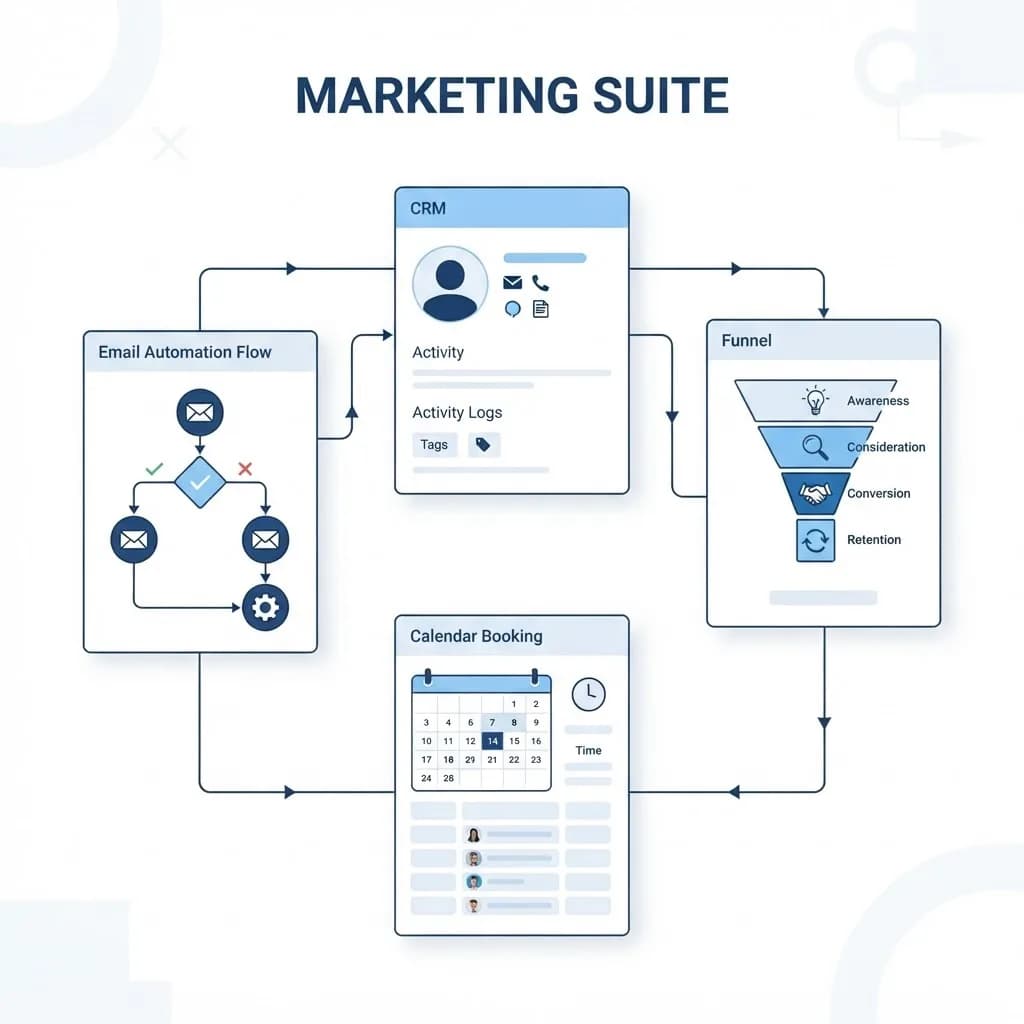
Boss Suite digital marketing sits in a fast-growing category: the all-in-one platform that promises to replace your CRM, email tool, landing page builder, booking calendar, review manager and reporting dashboard with a single subscription.
The appeal is obvious to any small business owner paying for six tools that barely talk to each other. The risk is equally real — consolidating everything into one suite means one vendor now owns your customer data, your funnels and your automations.
This guide breaks down what suites like this actually contain, who genuinely benefits, what they cost once you include the hidden line items, and how to evaluate one before you migrate your business into it.
What Is an All-In-One Marketing Suite?
An all-in-one marketing suite is software that bundles the tools a small business uses to capture, nurture and convert leads into one interface with shared data. Boss Suite digital marketing platforms typically combine a lightweight CRM, email and SMS automation, forms, landing pages, pipelines, appointment scheduling and reporting.
The technical argument for suites is data unity. When your form, CRM and email tool share one database, a lead can trigger a text, enter a pipeline stage and appear in a report without any integration work.
The trade-off is depth: a suite's email tool is rarely as strong as a dedicated email platform, and its CRM is rarely as flexible as a real CRM. You are buying convenience and consolidation, not best-in-class components.
Who Uses Marketing Suites?
Suites reward businesses with simple funnels and no technical staff. They frustrate businesses with complex or unusual processes.
- Local service businesses — clinics, salons, contractors, gyms — that mainly need lead capture, reminders and follow-up.
- Solo consultants and coaches selling a small number of offers through booking calls.
- Small marketing agencies managing several client accounts from one login, often reselling access.
- Teams with no developer who cannot maintain integrations between separate tools.
- Businesses currently drowning in spreadsheets and manual follow-up.
Key Features Worth Evaluating
CRM and Pipeline Management
The core of any suite is a contact record with history and a visual pipeline. Check whether you can define custom fields, multiple pipelines and stage-based automation, because most businesses outgrow a single fixed pipeline within a year.
Email and SMS Automation
Look past the visual builder and examine deliverability practices, sending limits, message costs and whether SMS is included or billed separately. Suites that resell messaging often charge per segment, which surprises people at scale. If email is your main revenue channel, compare the suite's capability against a focused email marketing setup before consolidating.
Pages, Forms and Funnels
Built-in page builders are convenient but often produce slow, template-bound pages with limited control over structure and speed. That matters because page performance affects both conversion and search visibility. Many businesses keep their main site on their own stack — built through dedicated React web development — and use the suite only for campaign-specific landing pages.
Reporting and Attribution
A suite can genuinely beat separate tools here, since it sees the whole journey from form to closed deal. Verify that it tracks lead source properly, supports UTM parameters, and lets you export raw data rather than only viewing dashboards.
How to Evaluate and Get Started
Never migrate everything at once. Test with a real but contained workflow first.
- List your current tools and their true monthly total, including anything paid annually. This is your honest comparison baseline.
- Document your three most important workflows — for example new lead to booked call, quote to follow-up, past customer reactivation.
- Rebuild only one workflow inside the suite during a trial and run it in parallel with your existing setup.
- Test data export early. Confirm you can extract contacts, notes, pipeline history and message logs in a usable format.
- Price the full stack: subscription, per-seat costs, SMS and email overages, phone numbers and any onboarding fee.
- Check integration reality with your accounting, booking or ecommerce systems — native connection, Zapier-style workaround, or nothing at all.
- Migrate in stages, starting with the newest leads and leaving historical data until the workflow is proven.
Benefits
When a suite fits, the operational gains are substantial and immediate.
- Lower total cost than five or six separate subscriptions, in many cases.
- Fewer broken integrations, since data lives in one system rather than syncing across several.
- Faster team onboarding because staff learn one interface instead of six.
- End-to-end visibility from first click to closed sale in a single report.
- Automation that actually gets built, because the barrier to setting it up is much lower.
Potential Challenges
These are the issues that surface six to twelve months in, not during the trial.
- Vendor lock-in. Your funnels, automations and history live in a proprietary format that does not transfer cleanly.
- Feature ceilings. Individual modules are usually good enough rather than excellent, and workarounds accumulate.
- Hidden usage costs. SMS, email volume, extra users and phone numbers can double an advertised price.
- Data governance risk. One vendor holds your entire customer database, which raises real privacy and continuity questions.
Best Practices and Tips
Adopt a suite defensively so a future change of mind stays affordable.
- Export your contact database monthly and store it somewhere you control. Treat this as non-negotiable.
- Keep your primary website independent of the suite so your search rankings never depend on a subscription.
- Document every automation in a plain external document, so the logic survives a platform switch.
- Plan for scale early. If growth means more data, users and integrations, understand how the vendor handles it and how cloud infrastructure decisions will affect your options later.
Real-World Example
A four-location dental practice was running a booking tool, an email platform, a spreadsheet CRM, a review request service and a separate SMS reminder app — about 480 dollars a month with no shared data. Front desk staff manually retyped patient details between systems, and no one could say which marketing channel produced new patients.
They trialled an all-in-one suite with a single workflow: new enquiry to booked appointment, including automatic confirmation, reminder texts and a review request afterward. It worked, so they migrated new leads first and kept historical records exported and archived separately. Missed appointments fell noticeably because reminders became automatic, and for the first time they could attribute new patients to source.
They also made one deliberate exception: the public website stayed on its own platform. That decision meant a later pricing change at the suite vendor was an inconvenience rather than an emergency, because their search rankings and organic traffic were never hostage to the subscription.
Why It Matters
Tool sprawl quietly taxes small businesses — in fees, in staff time, and in decisions made without data because the numbers live in five places. A suite solves that, which is why Boss Suite digital marketing style platforms keep gaining ground.
But consolidation is a strategic choice about where your customer data lives and how easily you could leave. Make it deliberately, with exports, documentation and an independent website as your insurance policy, and the convenience becomes an asset rather than a dependency.
Frequently Asked Questions
Is an all-in-one marketing suite better than separate tools?
It is better for small teams with simple funnels and no technical support, because shared data and one interface outweigh feature depth. Separate best-in-class tools win when one channel is critical to revenue and needs advanced capability.
What should a marketing suite cost?
Entry tiers commonly run 50 to 300 dollars a month, with agency and multi-location plans higher. Always add expected SMS, email overage and per-seat charges before comparing to your current stack.
Can I move my data out later?
Contacts and basic notes usually export cleanly. Funnels, automations, page designs and message history often do not, so document your automation logic externally and export contacts on a schedule.
Should I build my website inside the suite?
Generally no. Keep your main site on independent, portable technology so page speed, technical SEO and long-term rankings are not tied to a subscription you might cancel.
Conclusion
Boss Suite digital marketing and platforms like it can genuinely simplify a small business, cutting cost and manual work while finally connecting leads to revenue. The safe path is a single-workflow trial, honest total-cost math, monthly exports and an independent website.
If you want your suite, site and campaigns working as one system without locking your business into a single vendor, explore custom web application development and keep control of the parts that matter most.
Enjoyed this article? Share it with others!